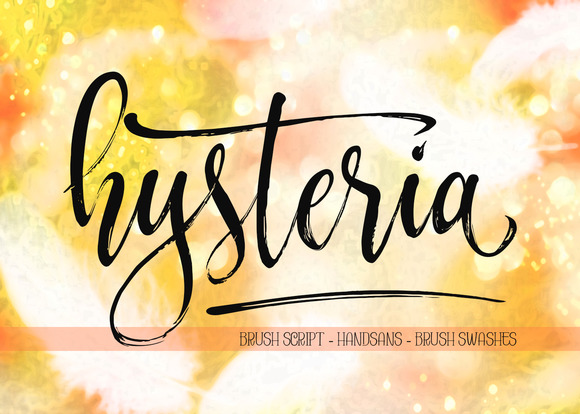
Hysteria: A Brush Script for Elegant Web Design
As a web designer, I'm always on the lookout for fonts that can add a touch of elegance and personality to my projects. Recently, I had the opportunity to test Hysteria, a unique brush script, in a real website layout. The font's flowing, hand-painted style immediately caught my eye, and I was eager to see how it would perform in a digital setting.
Visual Characteristics and Personality
Hysteria is a premium font that brings a sense of sophistication and creativity to any design. Its brush-like strokes and fluid lines give it a natural, organic feel, making it perfect for adding a human touch to digital experiences. The font's elegant and expressive nature makes it stand out, especially in hero sections and call-to-action areas where you want to make a strong visual impact.
Testing Hysteria in Real Web Layouts
I decided to test Hysteria on a boutique online store, where the brand's aesthetic needed to be both inviting and professional. The first area I focused on was the hero section. Placing Hysteria as the main heading over a high-quality image banner, the font instantly elevated the overall look. The brush script's graceful curves and dynamic flow made the text feel like an integral part of the image, rather than just an overlay.
Next, I previewed the font on mobile devices. Hysteria's readability on smaller screens was a concern, but with careful sizing and spacing, it performed well. The font's distinct character shapes and smooth transitions maintained legibility, even at smaller sizes. This is crucial for maintaining a consistent brand experience across all devices.
Using Hysteria in Different Web Elements
Beyond the hero section, I experimented with Hysteria in various other parts of the website. For section headings, the font added a touch of elegance and helped to create a clear visual hierarchy. When used for buttons and short phrases, Hysteria provided a decorative accent that drew the user's attention without overwhelming the design.
- Hero Titles: Perfect for creating a strong, memorable first impression.
- Section Headings: Adds a touch of elegance and helps to guide the user through the content.
- Buttons and Short Phrases: Provides a decorative accent that enhances the overall design.
Readability and Accessibility Considerations
While Hysteria is visually stunning, it's important to consider its readability in different contexts. For instance, using Hysteria for long body copy or small navigation text might not be ideal due to its decorative nature. In these cases, pairing Hysteria with a clean sans serif font, such as Arial or Helvetica, can help maintain readability and accessibility.
For dark backgrounds, I found that Hysteria worked best with a slightly lighter weight and a subtle drop shadow to enhance legibility. On light backgrounds, the font's natural ink-like texture provided a beautiful contrast, making it stand out effortlessly.
Font Pairing and Webfont Availability
To ensure a balanced and professional design, I recommend pairing Hysteria with a simple sans serif or a clean serif font. This combination allows Hysteria to shine in key areas while maintaining a readable and accessible layout. For example, using a sans serif like Roboto for body text and Hysteria for headings creates a modern and elegant look.
When integrating Hysteria into your web design, make sure to check the included styles, webfont availability, and file formats. Most importantly, verify that the font has the necessary commercial licensing for use in client projects, online stores, and digital templates. This ensures that you can use the font legally and effectively in your web designs.
Final Impressions and Recommendations
In conclusion, Hysteria is a versatile and elegant brush script that can add a unique and sophisticated touch to your web designs. Its natural, hand-painted style makes it ideal for creative portfolios, boutique online stores, coaching websites, and more. By carefully considering its use in different elements and pairing it with complementary fonts, you can create a visually appealing and professional online presence.
Whether you're designing a landing page, a blog header, or a digital brand kit, Hysteria is a font that can help you achieve a memorable and engaging user experience. Give it a try and see how it can transform your next web project.